Book 메소드 생성
package com.kh.chap01_oneVSmany.model;

public class Book {

	// 필드부
	// 도서명, 저자, 가격, 출판사

	private String title;
	private String author;
	private int price;
	private String publisher;

	// 생성자
	// 기본생성자
	public Book() {}

	// 전체 매개변수 생성자
	public Book(String title, String author, int price, String publisher) {
		this.title = title;
		this.author = author;
		this.price = price;
		this.publisher = publisher;

	}

	// 메소드부
	// getter - setter
	public String getTitle() {
		return title;
	}

	public void setTitle(String title) {
		this.title = title;
	}

	public String getAuthor() {
		return author;
	}

	public void setAuthor(String author) {
		this.author = author;
	}

	public int getPrice() {
		return price;
	}

	public void setPrice(int price) {
		this.price = price;
	}

	public String getPublisher() {
		return publisher;
	}

	public void setPublisher(String publisher) {
		this.publisher = publisher;
	}

	public String information() {
		return title + ", " + author + ", " + price + ", " + publisher;
	}

}
객체 배열을 사용하지 않고 Book객체 관리
package com.kh.chap01_oneVSmany.run;

import java.util.Scanner;

import com.kh.chap01_oneVSmany.model.Book;

public class ObjectRun {

	public static void main(String[] args) {

		// 복습
		// 방법1. 기본생성자로 생성 한 후 setter 메소드를 이용해서 값 초기화
		/*
		Book bk = new Book();
		bk.setTitle("자바의 정석");
		bk.setAuthor("차은우");
		bk.setPrice(10000);
		bk.setPublisher("kh");
		*/

		// 방법 2. 매개변수 생성자를 통해서 아싸리 생성과 동시에 값을 초기화
//		Book bk = new Book("자바의 정석", "차은우", 10000, "kh");

		// [응용] 사용자에게 입력받은 값으로 객체 생성 후 초기화
		/*
		Scanner sc = new Scanner(System.in);
		System.out.print("도서명 : ");
		String title = sc.nextLine();

		System.out.print("저자명 : ");
		String author = sc.nextLine();

		System.out.print("가격 : ");
		int price = sc.nextInt();

		sc.nextLine();

		System.out.print("출판사 : ");
		String publisher = sc.nextLine();

		Book bk = new Book(title,author,price,publisher);

		System.out.println(bk.information());
		*/

		// 세개의 Book 객체를 관리해야된다면 ?
		Scanner sc = new Scanner(System.in);
		Book bk1 = null;
		Book bk2 = null;
		Book bk3 = null;

		// 3권의 도서에 대한 정보를 반복적으로 사용자에게 입력 받기
		// => 입력받은 후 각 객체 생성과 동시에 초기화(값대입)
		for(int i = 0; i < 3; i++) {	// i = 0, 1, 2
			System.out.println(i+1 + "번째 도서정보 입력");
			System.out.print("도서명 : ");
			String title = sc.nextLine();

			System.out.print("저자명 : ");
			String author = sc.nextLine();

			System.out.print("가격 : ");
			int price = sc.nextInt();

			sc.nextLine();

			System.out.print("출판사 : ");
			String publisher = sc.nextLine();

			if(i == 0) {
				bk1 = new Book(title, author, price, publisher);
			}else if(i == 1) {
				bk2 = new Book(title, author, price, publisher);
			}else {
				bk3 = new Book(title, author, price, publisher);
			}
		}	// 객체 생성 끝

		// 전체 도서 정보 조회하기 => 일일히 각 객체의 출력문 작성(반복문 활용x)
		System.out.println(bk1.information());
		System.out.println(bk2.information());
		System.out.println(bk3.information());

		// 도서 제목으로 검색하는 서비스
		System.out.println("검색할 책 제목 : ");
		String search = sc.nextLine();

		if(bk1.getTitle().equals(search)) {
			System.out.println(bk1.information());
		}

		if(bk2.getTitle().equals(search)) {
			System.out.println(bk2.information());
		}

		if(bk3.getTitle().equals(search)) {
			System.out.println(bk3.information());
		}

	}

}
객체 배열을 사용해서 Book 객체 관리
package com.kh.chap01_oneVSmany.run;

import java.util.Scanner;

import com.kh.chap01_oneVSmany.model.Book;

public class ObjectArrayRun {

	public static void main(String[] args) {

		Scanner sc = new Scanner(System.in);
		// 객체 배열 활용해서 해보기!!
		// 세 개의 Book 객체를 관리한다면?
		Book[] books = new Book[3];

		// 세개의 도서에 대한 정보를 반복적을 입력 받아 각 인덱스에 객체 생성
		for(int i = 0; i < books.length; i++) {	// for 문 시작
			System.out.println(i + 1 + "번째 도서정보 입력");

			System.out.print("도서명 : ");
			String title = sc.nextLine();

			System.out.print("저자명 : ");
			String author = sc.nextLine();

			System.out.print("가격 : ");
			int price = sc.nextInt();

			sc.nextLine();

			System.out.print("출판사 : ");
			String publisher = sc.nextLine();

			/*
			Books[0] = new Book(어쩌구);
			Books[1] = new Book(저쩌구);
			Books[2] = new Book(얼씨구);
			*/
            // 위 주석 코드를 객체 배열로 생성한다면 ?
			books[i] = new Book(title, author, price, publisher);

		}	// for문 끝

		// 객체 생성 끝
		/*
		System.out.println(books[0].information());
		System.out.println(books[1].information());
		System.out.println(books[2].information());
		*/
		// 전체 도서 정보들 조회하기 => 위 코드 대신 반복문 활용  가능
		for(int i = 0; i < books.length; i++) {
			System.out.println(books[i].information());

		}

		// 도서 제목으로 검색하는 서비스
		System.out.print("검색할 책 목록 : ");
		String search = sc.nextLine();
		/*
		if(books[0].getTitle().equals(search)) {
			System.out.println(books[0].information());
		}

		if(books[1].getTitle().equals(search)) {
			System.out.println(books[1].information());
		}

		if(books[2].getTitle().equals(search)) {
			System.out.println(books[2].information());
		}
		*/
        // 위 코드를 반복문을 사용해서 출력하면 ?
		for(int i = 0; i < books.length; i++) {
			if(books[i].getTitle().equals(search)) {
				System.out.println(books[i].information());
			}
		}
	}

}
이름, 브랜드명, 가격, 시리즈를 인스턴스 변수로 갖는 Phone 객체를 만들고 데이터를 넣어준다.
그 후 사용자에게 구매하고자 하는 핸드폰명을 입력받아 해당 휴대폰을 찾은 후에 그 가격을 알려주도록 해보자
package com.kh.chap02_objectArray.model.vo;

public class Phone {

	// 이름, 브랜드명, 가격, 시리즈
	private String name;
	private String brand;
	private int price;
	private String series;

	// 기본생성자
	public Phone() {

	}

	// 매개변수 생성자
	public Phone(String name, String brand, int price, String series) {
		this.name = name;
		this.brand = brand;
		this.price = price;
		this.series = series;

	}

	public void SetName(String name) {
		this.name = name;
	}

	public String getName() {
		return name;
	}

	public void setBrand(String brand) {
		this.brand = brand;
	}

	public String getBrand() {
		return brand;
	}

	public void setPrice(int price) {
		this.price = price;
	}

	public int getPrice() {
		return price;
	}

	public void setSeries(String series) {
		this.series = series;
	}

	public String getSeries() {
		return series;
	}

	public String information() {
		return name + " " + brand + " " + price + " " + series;
	}

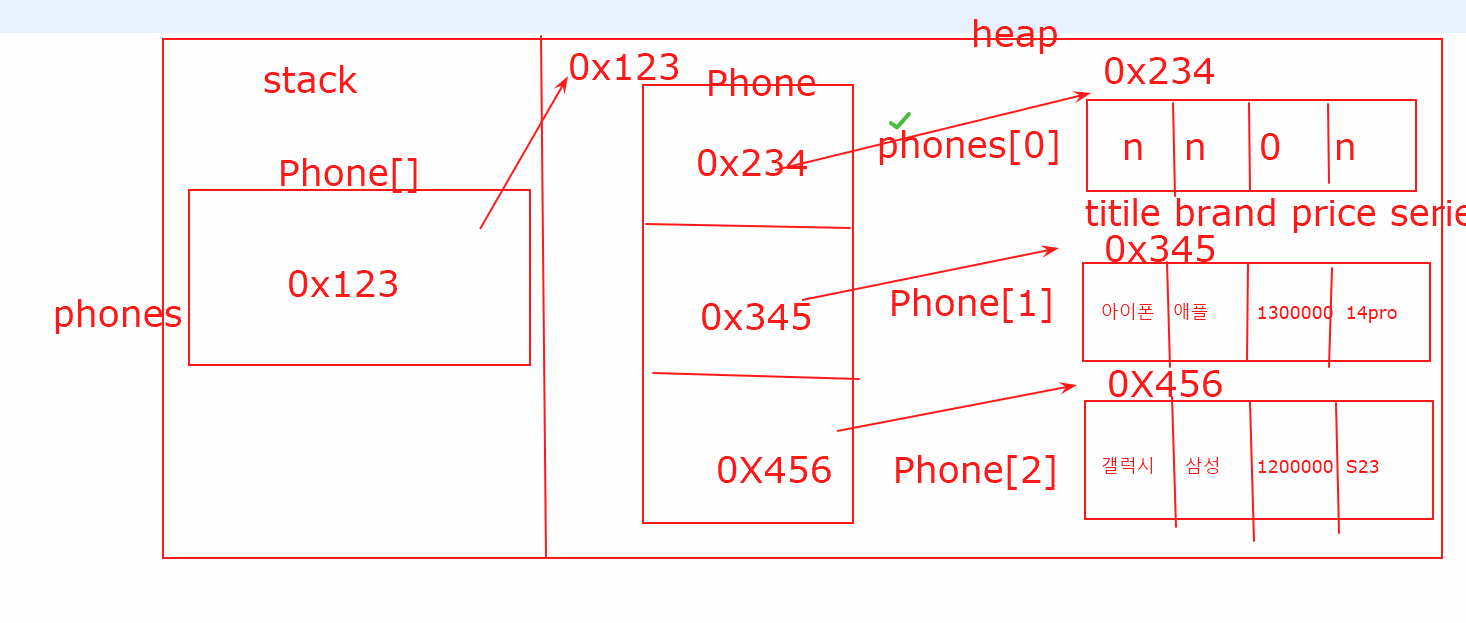
}
실행 Class
package com.kh.chap02_objectArray.run;

import java.util.Scanner;

import com.kh.chap02_objectArray.model.vo.Phone;

public class ObjectArrayRun {

	public static void main(String[] args) {
		// TODO Auto-generated method stub
		int[] arr = new int[3];

		arr[0] = 10;
		arr[1] = 20;
		arr[2] = 30;

		// for loop문 => 단순한 for문
		for(int i = 0; i < arr.length; i++) {
			System.out.println(arr[i]);
		}

		Phone[] phones = new Phone[3];	// 배열 생성 !!!!
		/*
		System.out.println(phones);
		System.out.println(phones[0]);
		phones[0].SetName("아이폰");
		*/

		phones[0] = new Phone();
		phones[1] = new Phone("아이폰", "애플", 1300000,"14pro");
		phones[2] = new Phone("갤럭시", "삼성", 1200000, "s23");

		phones[0].SetName("벨벳폰");
		phones[0].setBrand("엘지");
		phones[0].setPrice(1000000);
		phones[0].setSeries("1");

		int total = 0;
		for(int i = 0; i < phones.length; i++) {
			System.out.println(phones[i].information());
			total += phones[i].getPrice();
		}

		System.out.println("총가격 : " + total);
		System.out.println("평균가격 : " + total / phones.length);

		// 사용자에게 구매하고자 하는 핸드폰명을 입력받아
		// 해당 휴대폰을 찾은 후에 그 가격을 알려주도록
		// 구매하고자 하는 휴대폰 이름 입력 : 벨벳폰
		// 당신이 구매하고자 하는 휴대폰의 가격은 1000000원 입니다.

		Scanner sc = new Scanner(System.in);

		System.out.print("구매하고자 하는 휴대폰 이름 입력 : ");
		String buy = sc.nextLine();

		for(int i = 0; i < phones.length; i++) {
			if(phones[i].getName().equals(buy)) {
				System.out.println("당신이 구매하고자 하는 휴대폰의 가격은 " + phones[i].getPrice() + "원 입니다.");
			}
		}
		sc.close();
	}

}